CloudsRAID Help
|
CloudsRAID Help
|
Home / Main Index / General Option |
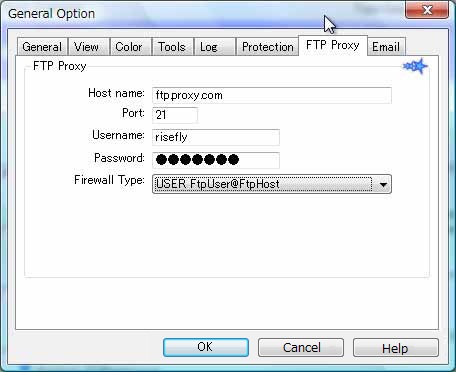
Setup the FTP Proxy sever or FTP firewall.
Proxy Host Name:
Specify the IP address or the hostname of the FTP Firewall server, or FTP Proxy server.
If the FTP Proxy server is not used, let the edit box be empty.
User name, password:
Specify the user account and password of the firewall server.
Firewall type:
Select the firewall type in the Combo box list.
Explanation of the fields in the following table:
ftpUser: User account of the FTP server.
ftpPass: Password to logon to the FTP server.
ftpHost: The host name and port number of the FTP server.
fireUser: User account of the Firewall server.
firePass: Password of the Firewall server.
Firewall Type FTP command at connection no firewall >USER ftpUser
>PASS ftpPassSITE hostname >USER fireUser
>PASS firePass
>SITE ftpHost
>USER ftpUser
>PASS ftpPassUSER after logon >USER fireUser
>PASS firePass
>USER ftpUser@ftpHost
>PASS ftpPassproxy OPEN >OPEN ftpHost
>USER ftpUser
>PASS ftpPassTransparent >USER fireUser
>PASS firePass
>USER ftpUser
>PASS ftpPassUSER FtpUser@FtpHost >USER ftpUser@ftpHost
>PASS ftpPassUSER FireID@FtpHost >USER fireUser@ftpHost
>PASS firePass
>USER ftpUser
>PASS ftpPassUSER FtpUser@FtpHost FireID >USER ftpUser@ftpHost fireUser
>PASS ftpPassUSER FtpUser@FireID@FtpHost >USER ftpUser@fireUser@ftpHost
>PASS ftpPass@firePass
|
CloudsRAID Help
|
Home / Main Index / General Option |