CloudsRAID Help
|
CloudsRAID Help
|
Home / Main Index / Task Wizard |
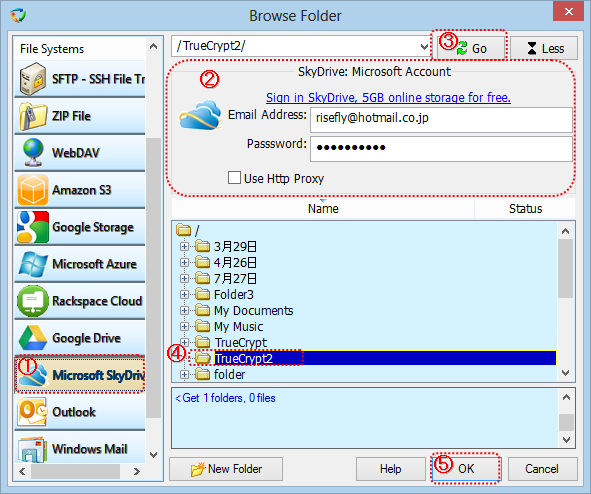
(1). Select "OneDrive" in the "File System" list.
(2). Setup the parameters for connecting to the Microsoft OneDrive.
If you have not got an account, you can click "Sign in OneDrive, 5GB online storage for free" link to apply a Microsoft Account.
Email Address: The name of the microsoft account.
Password: The password of the account.
Use http Proxy:
If the local computer is behind a firewall or NAT, usually the computer needs the proxy to connect to the OneDrive.
If this option is checked at the first time, the "http Proxy" dialog box will be popped up for setup up the http proxy server.
(3). After set up the parameters above, press "Go" button to connect to the OneDrive, and list the folders into the tree view.
The log window below the treeview logs all the commands sent to the OneDrive, and responses from the OneDrive. If the connection between CloudsRAID and OneDrive can not be established successfully, please check the log.
(4). Select the folder in the tree view.
(5). Click "OK"button to end the dialog box
|
CloudsRAID Help
|
Home / Main Index / Task Wizard |